Microsoft Teams Phone in Switzerland: A comparison of licenses, setup, and providers
Key takeaways
- Microsoft Teams Telephony replaces the traditional phone system with a cloud-based solution, allowing one number to reach all devices simultaneously (desktop, smartphone, home office).
- Three connection models in Switzerland: Microsoft Calling Plan, Direct Routing (the most widely used), and Operator Connect.
- The provider landscape ranges from large network operators (Swisscom, Sunrise) to specialized VoIP providers (sipcall, iWay). We recommend sipcall as our preferred partner for an all-in-one solution.
- Existing phone numbers can generally be ported to the new provider without any issues.
- Five-step implementation: Planning phase (including licensing, connection model, and devices), defining call flows, technical configuration, training, rollout, and migration including number porting.
- Benefits: no separate hardware, location-independent accessibility, integration of telephony, chat, and meetings in one platform, and provider independence.
- Plan for challenges: connected peripheral devices such as alarm systems, elevators, or fire alarms, as well as replacing DECT phones in warehouses, require special attention during the planning phase.
- Important special note: Emergency calls require correctly stored location information; this must be configured separately with the provider during setup.
More and more Swiss companies are replacing their traditional phone systems and instead making calls directly via Microsoft Teams. One number for all devices, no separate hardware, and the integration of telephony, chat, and meetings into a single application make this solution particularly attractive for companies with hybrid work models. As Baggenstos we support companies through this exact transition. In this article, we show you which technical connection options exist, which providers are available in Switzerland, and how the setup process works within a company.
Microsoft Teams Telephony as a cloud-based phone system
Microsoft Teams Telephony, also known as Teams Phone, replaces the traditional physical phone system with a cloud-based solution directly within Microsoft Teams. Employees make calls using their existing landline number, regardless of whether they are at their desktop, on their smartphone, in the home office, or on the go—all devices are reached simultaneously with the same number. This completely eliminates the need for a separate number per device or a physical PBX system.
Features offered by Microsoft Teams Telephony
- Calls and accessibility: Employees can answer, make, and transfer calls with features such as consultative transfers, call forwarding, and simultaneous ringing on multiple devices, ensuring no call is missed.
- Customer service and reception: Using call queues and auto-attendants, incoming calls can be automatically routed to the appropriate department, including settings for business hours and public holidays.
- Voicemail and summaries: Voicemail messages are automatically transcribed, and AI-powered summaries recap meetings and their next steps.
- Security and reliability: Calls are end-to-end encrypted, and for mission-critical locations, there are additional solutions that keep calls running even during a local internet outage.
You can find further quick guides, such as those for call forwarding or call pickup, in the official "Get Started with Teams Phone" playlist from Microsoft Teams.
Operating models for Teams telephony in Switzerland
There are generally three models available in Switzerland for connecting to the public switched telephone network (PSTN):
Microsoft Calling Plan
With a Calling Plan, the company obtains the telephony license and the connection to the telephone network directly from Microsoft. This model is easy to set up, but in Switzerland, it currently comes with limited availability and a restricted selection of phone numbers.
Direct Routing with a local provider
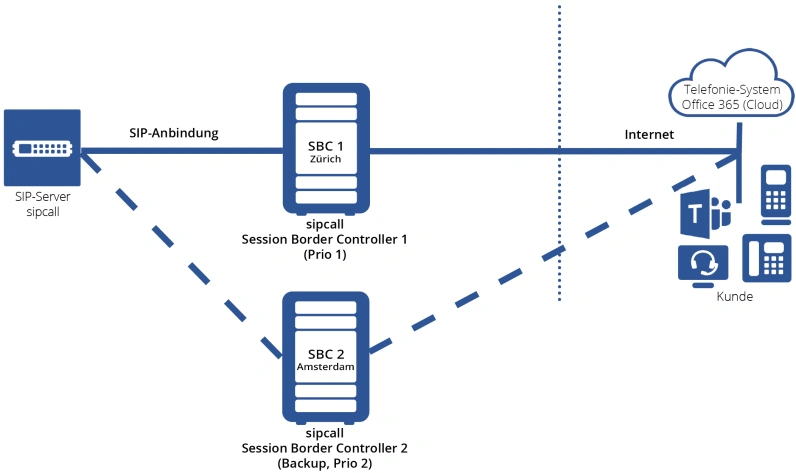
With Direct Routing, a local telecommunications provider is connected to Microsoft Teams via a Session Border Controller (SBC). This model is the most widely used in Switzerland, as it can be combined with almost any SIP trunk and existing phone numbers can be ported easily.
Operator Connect
Operator Connect links certified providers directly to Microsoft Teams without the need to operate your own Session Border Controller. This makes the setup simpler than traditional Direct Routing, although the number of certified providers in Switzerland is currently still limited.
A comparison of Teams telephony providers in Switzerland
The Swiss market for Teams telephony is now well-established, ranging from large network operators to specialized cloud telephony providers:
Our recommended solution: sipcall
For Direct Routing, we prefer to work with sipcall, our partner for Microsoft Teams telephony without the need for your own Session Border Controller. This allows us to offer you the entire solution from a single source, from consulting and setup to ongoing operation. Only the actual telephony costs are billed directly by sipcall. You can find more about the solution at Microsoft Teams telephony without your own SBC: Calling with Microsoft Teams.
Alternative: Swisscom or Sunrise
Alternatively, we also support connectivity via the two major Swiss network providers, Swisscom and Sunrise. In this case, we handle the configuration and implementation of the solution, while the network connection is provided directly by Swisscom or Sunrise.
Which model is best for your company depends on your existing network infrastructure, the desired number porting, and the required level of support; we would be happy to provide you with individual advice..
How to set up Microsoft Teams Phone for your business
The introduction of Teams Phone can be structured into clear steps:
1. Conceptual phase:
Assess your current situation and requirements, including existing configurations and potential edge cases such as connected peripheral devices or wireless telephony in warehouses (see challenges below). During this phase, also determine the appropriate licensing model, connection model, provider, and the necessary end devices.
2. Define call flows
Define which phone numbers are routed where and determine the auto attendants, call queues, and voicemails required.
3. Technical configuration
Set up Teams Phone in the Teams Admin Center and configure the Session Border Controller according to the previously defined call flows.
4. Train employees
Train your employees on the new features, such as call forwarding, voicemail, and shared extensions, before the solution goes live.
5. Rollout and migration
Carry out the number porting as part of the final migration, activate the new solution, and then decommission the existing telephone system.
Challenges you should plan for
Beyond simple licensing and connectivity, the switch to Teams Phone often involves challenges that are easily overlooked during the planning phase:
Peripheral devices connected to the telephone network
Many existing telephone systems have additional devices connected alongside the actual telephone handsets, such as franking machines, elevator systems, alarm systems, or fire alarms. These devices often communicate via a classic analog telephone line and cannot be connected directly to Teams telephony without further ado. During the design phase, it should therefore be clarified which peripheral devices are affected and whether a separate analog connection or a connection via an Analog Telephone Adapter (ATA) must be maintained for them.
Replacing cordless phones in warehouses and production facilities
In warehouses or production areas, employees are often reachable via cordless DECT phones. When switching to Teams telephony, there are two alternatives available: Wi-Fi-enabled mobile phones with the Teams app or DECT phones specifically certified for Microsoft Teams. Which option is suitable depends, among other things, on the local Wi-Fi coverage as well as the requirements for the robustness and battery life of the devices.
Benefits of Teams telephony for Swiss companies
- One number for all devices: Calls reach employees simultaneously on their desktop, smartphone, and tablet.
- No separate hardware required: The classic telephone system is completely eliminated.
- Location-independent accessibility: Telephony works equally well in the office, at home, and on the go.
- Integration into one platform: Telephony, chat, meetings, and file storage all run within the same application.
- Provider independence: Existing providers can continue to be integrated via Direct Routing.
How Baggenstos supports the introduction of Teams telephony
As a long-standing Microsoft partner, we support companies from license consulting and choosing the right connection model to technical setup and training for your employees. As part of our services in the area of Modern Work we ensure that Teams telephony is seamlessly integrated into your existing Microsoft 365 environment, rather than functioning as an isolated add-on solution.
Conclusion
Microsoft Teams telephony replaces the classic telephone system with a cloud-based, location-independent solution directly within the familiar Microsoft 365 environment. With sipcall as a preferred partner, the solution can be implemented from a single source, while challenges such as connected peripheral devices or the replacement of cordless telephony in warehouses should be considered during the design phase. How smoothly the transition succeeds depends less on the chosen connection model itself than on careful planning in advance.
Would you like to know what switching to Teams Phone could look like for your company? Get in touch with us, we are happy to advise you on licensing, choosing a provider, potential challenges, and implementation.
Frequently Asked Questions
Do emergency calls work reliably via Microsoft Teams telephony?
Yes, emergency calls are supported. However, the location of the devices must be correctly registered for emergency services, as there is no automatic location detection for mobile workstations or home offices, unlike with a traditional landline system. This should be firmly integrated into the setup process.
What happens if my internet connection goes down while using Microsoft Teams?
Since Teams Phone is cloud-based, a stable internet connection is required to make and receive calls. For business-critical availability, we therefore recommend a redundant internet connection or a mobile backup solution.
Does Teams Phone support call queues and auto attendants?
Yes, Microsoft Teams Phone offers features such as call queues and auto attendants, which allow you to route calls directly to specific teams or departments.
Can the old telephone system continue to run in parallel during the transition?
Yes, running systems in parallel is common practice and highly recommended. This allows you to test Teams Phone with a pilot group before fully decommissioning your existing system.
How long does it usually take to port a phone number to a new provider?
This depends on the chosen provider and connection model; however, porting with Swiss providers often takes several weeks and should therefore be factored into the project plan at an early stage.
How much do international calls cost with Teams Phone?
This depends on the connection model you choose: with a Microsoft Calling Plan, Microsoft's own international rates apply, while Direct Routing or Operator Connect use the rates of your chosen provider. It is therefore worth comparing international terms before selecting a provider. You can find sipcall's current telephony rates at "VoIP telephony from sipcall: attractive flat rates".
Who is responsible in the event of a disruption, Microsoft or the provider?
With Direct Routing and Operator Connect, the responsibility for the connection to the telephone network lies with the respective provider, while Microsoft is responsible for the Teams platform itself. Clear responsibilities and response times should be contractually defined with the provider.

You might also be interested in