Microsoft Ignite 2026: The 10 Most Important Announcements
Key takeaways
- Copilot is evolving into a collaborative workspace for humans and AI agents, featuring Home, Workspaces, and Autopilot.
- Microsoft IQ is now generally available, giving agents access to a company's knowledge base without requiring a new subscription.
- Agent 365 is designed to make agents controllable and their costs transparent, though key components are still in preview.
- Microsoft Perception is generally available and deploys specialized security agents to counter AI-driven attacks, with Entra and Purview serving as the foundation.
- Foundry, the MAI models, and Windows Server 2028 are expanding the technical foundation for AI in the cloud and on-premises.
Microsoft Ignite will take place in San Francisco and online from November 17 to 20, 2026. Microsoft is unveiling new technologies centered on AI, Copilot, security, and the cloud, with a vast number of announcements. We have selected the ten innovations that carry the most weight for businesses and categorized them based on the official Book of News . Features that are initially available through the Frontier program, Microsoft's early-access program, are marked accordingly.
Satya Nadella framed Ignite around three core themes that run through all the announcements:
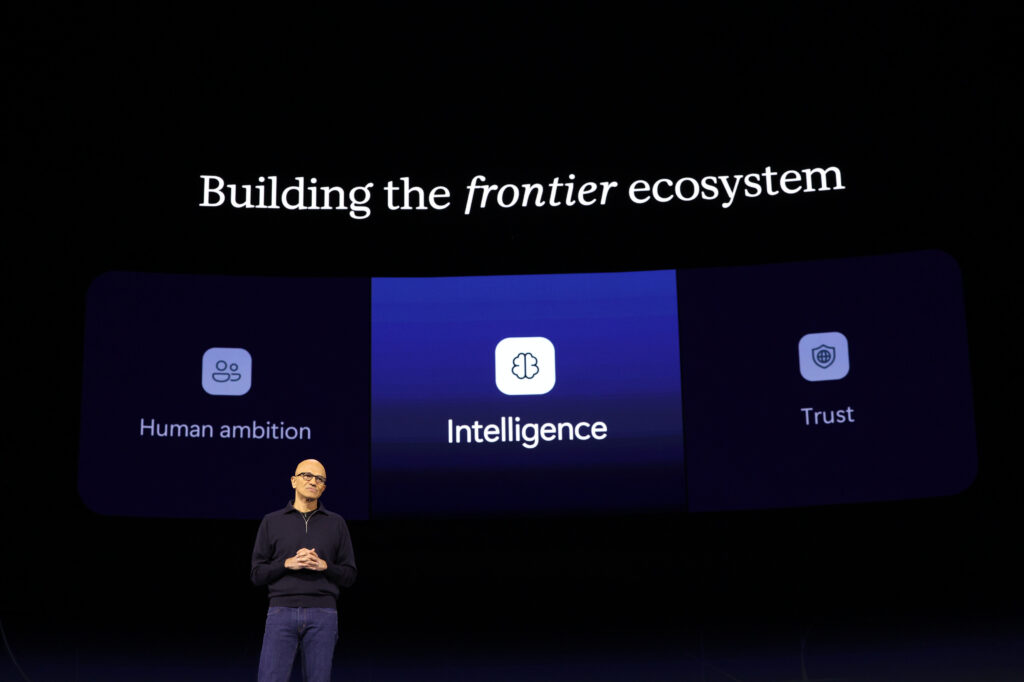
- Human Ambition: AI is intended to empower people to achieve more.
- Intelligence: A company's own knowledge becomes a competitive advantage when AI can leverage it.
- Trust: Agents must remain secure and controllable. Microsoft emphasizes that trust, security, and human oversight become increasingly important as AI is integrated more deeply into core processes.
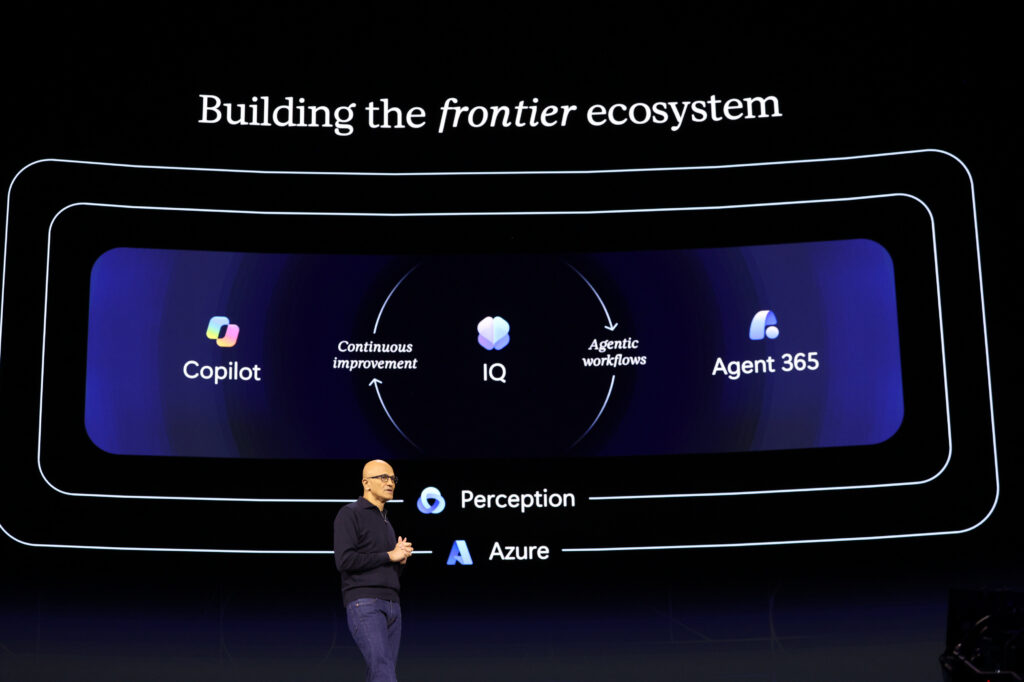
Microsoft describes the strategy behind this in the blog post Building the frontier ecosystem.
The most important moments from the opening keynote in under five minutes:
1. Copilot is becoming the central workspace
Microsoft is evolving Copilot from an assistant into a workspace. At the center is Home, the new starting point for chat and Cowork, which Microsoft introduced in September alongside Code and Autopilot and is now being rolled out globally. The Auto feature automatically selects the appropriate models and the necessary effort, recommending a switch from chat to Cowork for complex tasks. New and generally available is Office in Copilot: Word, Excel, and PowerPoint can be used directly within the Copilot app, with files stored in OneDrive and inheriting permissions, sensitivity labels, and compliance requirements.
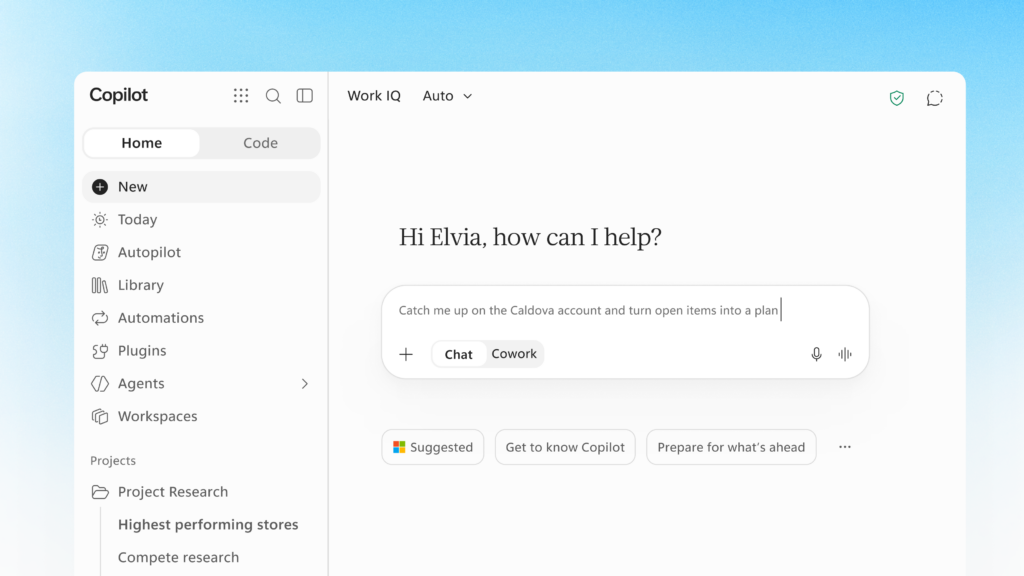
Until now, working with AI consisted of a prompt and a response. In the future, people will define a goal, and AI and agents will handle the steps required to reach the result. Companies should clarify early on which work processes can be organized directly within Copilot. A successful Copilot Adoption requires more than just licenses and training: clear use cases, a clean data foundation, as well as security and governance.
2. Copilot Workspaces bring people and agents to the table
Copilot Workspaces are shared workspaces within the Copilot app where teams, their work, and Copilot come together. They are an evolution of the previous Copilot Notebooks. Work IQ suggests relevant workspaces, and Copilot shows what has changed, what is still pending, and which tasks require attention. Soon, teams will also be able to bring their personal Autopilot into a workspace. Workspaces are currently available via the Frontier program. The official Microsoft video introduces them:
Instead of calling on AI for individual, isolated tasks, people and agents work together on projects over longer periods. This applies to project management as well as sales, marketing, finance, or IT. As a result, teams and processes change as soon as AI agents become part of a workspace alongside humans. Companies should therefore not just look at individual use cases, but design entire workflows involving both people and agents.
3. Autopilot keeps working, even without a new prompt
According to Microsoft, Autopilot is the first enterprise-grade personal productivity agent that independently carries out longer tasks. It lives in the organization's tenant, has its own identity, its own memory, and access to tools. It can track conversation histories, take over recurring tasks, and continue projects without waiting for the next prompt. Colleagues can address a person's Autopilot in Teams via an @-mention. Its actions run under a separate agent identity, are security-checked, and are visible and controllable by administrators.
Microsoft is initially rolling out Autopilot via the Frontier program; it is not yet generally available. Classic automation follows fixed rules, generative AI reacts to a prompt, and agentic AI is given a goal, plans work steps, and executes them over a longer period. Of particular interest are recurring tasks that currently still require many manual intermediate steps, even though the desired result is clearly defined.
4. Microsoft IQ makes corporate knowledge usable for AI
Even the most powerful model does not know a company's customers, contracts, and projects, nor its decisions and experiences. Microsoft IQ is designed to unlock this context for Copilot, agents, and applications. According to the Book of News, the platform is generally available and builds on existing products without requiring a new subscription. Work IQ provides context from daily work, Fabric IQ connects business data with metrics and operational significance, Foundry IQ unlocks unstructured content, Web IQ adds information from the web, and Third-party IQ connects third-party systems.
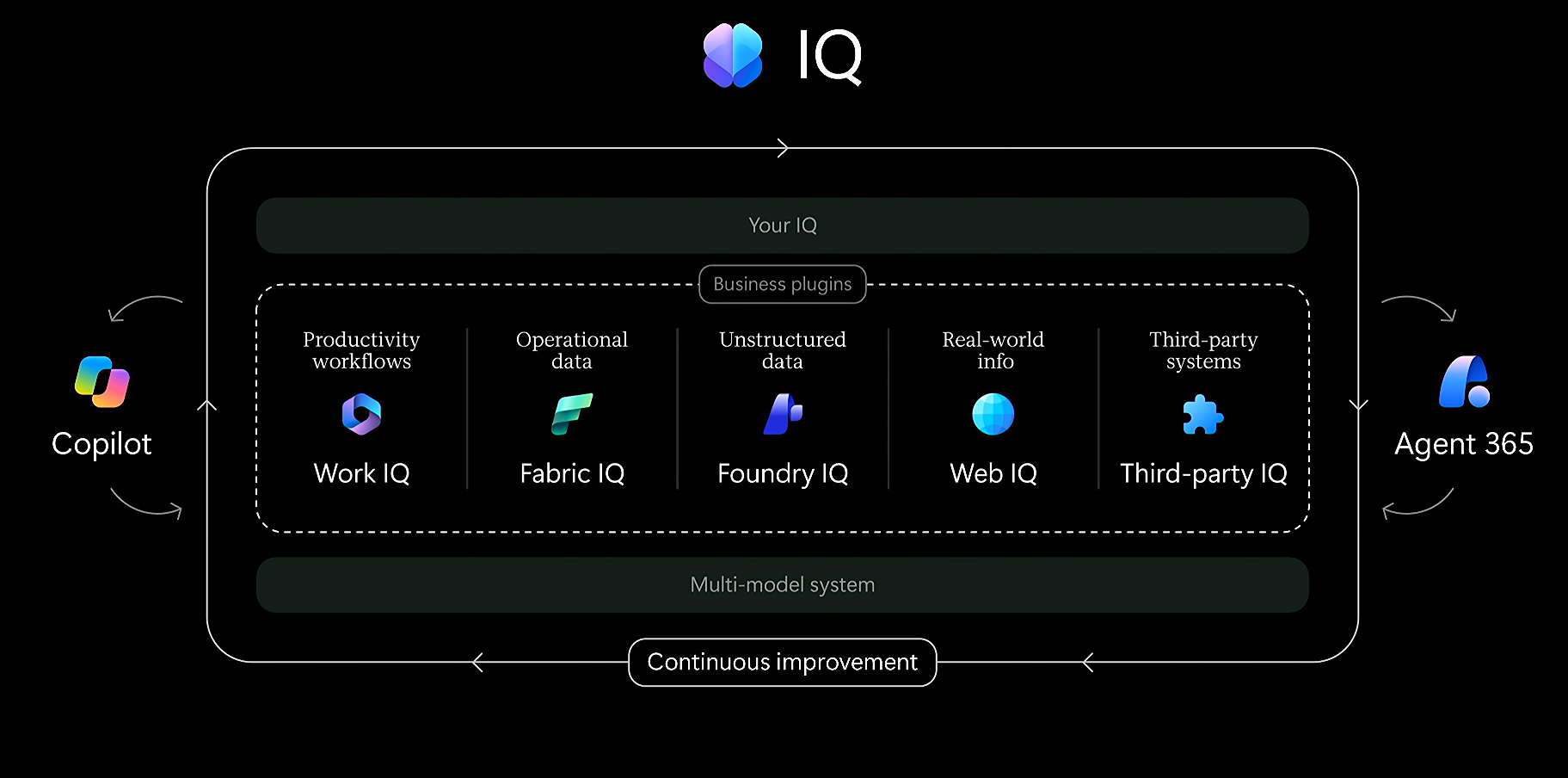
Business plugins, currently running in the Frontier program, bundle company-specific instructions, skills, and tools as reusable building blocks. Sensitivity labels and audit logs support management. The decisive factor is whether SharePoint, Teams, and permissions are organized in such a way that they form a reliable data foundation for AI is created.
5. Agent 365 brings order to the world of agents
As soon as a company uses not five, but five hundred agents, a new IT problem arises: Who knows which agents exist, who owns them, and what they are allowed to do? Agent 365 is Microsoft's central layer for the management, security, governance, and monitoring of agents. The fact that agents also need HRis already being implemented by Agent 365 today, and further functions were added at Ignite.
New features include centralized management of plugins and skills for Copilot and Cowork (generally available), an Action Center for inactive and ownerless agents (private preview starting in December), and governance for MCP servers and local agents (preview).
Basic insights into the use of Microsoft's own agents are available in the Admin Center regardless of your license. However, for enterprise-grade governance and security, an Agent 365 or ME7 license is required. A governance model for agents should be in place before their numbers grow significantly. Agent governance is likely to become as standard a discipline as identity management or endpoint management.
6. Agent 365 brings FinOps to AI
Agents use different models, perform varying numbers of tasks, and incur dynamic costs. Traditional license control is no longer sufficient for this. Agent 365 Cost Management provides a central view in the Microsoft Admin Center of the costs associated with usage-based AI services like Copilot Cowork, Copilot Code, Copilot Studio, or Autopilot. Administrators can set spending policies, limits, and alerts, and use the data via Microsoft Fabric for their own analysis. These features are in preview, with parts of them running in the Frontier program. The Microsoft video explains the approach:
Agent 365 Business Analytics in the Frontier program goes a step further by connecting costs with benefits: key metrics such as success rate, satisfaction, and supported working hours show whether an AI investment is paying off. Insights into Microsoft services require at least one Microsoft 365 Copilot license in the tenant, while services from other providers require an Agent 365 license. Companies should know what an agent costs and what measurable value it generates. AI FinOps should be part of the architecture from the start, rather than being introduced only after costs have become difficult to track.
7. Microsoft Perception turns AI agents into a security team
Attackers are using AI to find vulnerabilities faster, which is also reflected in the AI-driven patch flood . Microsoft's answer is Perception, which is now generally available: specialized security agents in three roles. Red Team agents search for vulnerabilities from an attacker's perspective, Blue Team agents triage alerts, investigate attacks, and detect threats, and Green Team agents assist with prioritization. According to Microsoft, the triage agent covers about 80 percent of alerts in a typical Defender queue. Critical actions can be tied to approvals, ensuring administrators retain control. The Microsoft video introduces Perception:
Also new is protection against unpatched vulnerabilities: Vulnerability Shielding in Defender (preview) applies targeted, temporary protective measures until a patch is available, and a playbook in Perception can coordinate permanent patching via Intune. The security question is thus shifting from static vulnerability lists to the assessment of actually reachable risks: Which vulnerabilities could a specific attacker really exploit in our environment today? Especially for companies with small IT teams, the question arises as to which of these tasks they should delegate to Managed Services to handle.
8. Entra and Purview become the foundation for secure agents
The more autonomously agents work, the more important the question becomes of who or what is allowed to access which data. Identity thus becomes the central control point. Microsoft Entra is gaining its own identities for agents via Agent ID, initially for local agents such as GitHub Copilot CLI and Claude Code, as well as for Autopilot (preview). In addition, Global Secure Access is being expanded with features for agent traffic, including an MCP firewall (preview). Companies are already familiar with the principles behind this from Zero Trust; they will apply to agents in the future as well.
Purview is also gaining in importance. Data should be automatically detected, classified, and labeled so that protection does not depend solely on manual labels. Data protection for Copilot is intended to block files with sensitive content even if they are not labeled (preview). Those who are already keeping an eye on Purview via the Purview Suite for Business Premium will find the right starting point here.
9. Foundry and MAI expand Microsoft's model ecosystem
Microsoft Foundry remains a platform for many models. Companies choose the model that best fits their specific use case in terms of quality, speed, cost, security, and regulatory requirements. In addition, Microsoft is building its own model family with Microsoft AI (MAI). Microsoft-Decision-1.1 is generally available and designed for fast, cost-effective decisions such as routing, classification, prioritization, and verification. In Copilot, for example, it determines whether a request is better handled by Copilot or Cowork.
For software development, MAI-Code-2 and MAI-Code-2-Flash are available, both accessible via GitHub. MAI-Image-2.7 for images is in preview, as is MAI-Cyber-2-Flash, which is designed for security tasks and runs only within the project codenamed MDASH. Depending on the task, it is important to weigh which model offers the best balance of quality, speed, cost, and data residency.
10. Windows Server 2028 brings hybrid AI to the data center
Windows Server 2028 is available in preview, and management is receiving a great deal of attention: selected servers can be managed via Microsoft Intune , just like Windows clients are today. To do this, the server joins Microsoft Entra ID, after which Intune takes over configuration, compliance, Win32 app deployment, and updates via Windows Autopatch with maintenance windows. For teams using Intune, this creates a unified console for both clients and servers. Microsoft describes this in a post in the Community Hub.
For context: this is intended for servers used like workstations, such as admin workstations, remote desktop hosts, or branch office servers. According to Microsoft, Azure Arc remains the recommended layer for monitoring and governance for production servers. It is currently a test for non-production servers, and licensing details are not yet available. Especially for Swiss companies with existing Azure Local environments , it is worth taking a look at which workload runs best in which location.
Six questions companies should be asking themselves now
Instead of working through a list of new Microsoft products, it is worth considering these six questions:
- Where does AI create real added value? Which processes are expensive, repetitive, knowledge-intensive, or slow?
- Is corporate knowledge ready for AI? Are SharePoint, Teams, Microsoft 365, and other data sources structured and permissioned in a way that allows Microsoft IQ to provide reliable context?
- Is the data ready for autonomous agents? Are sensitive data identified, classified, and protected?
- Is the identity and security architecture prepared for agents? Do Entra, Conditional Access, Defender, and Zero Trust also cover agent identities?
- How are agents and their costs controlled? Are there responsibilities, guidelines, monitoring, and an AI FinOps model in place?
- Which workloads will remain hybrid? What belongs in Azure, and what should run on-premises due to data protection, latency, or infrastructure requirements?
Conclusion: The path to an agentic enterprise begins with the fundamentals
Ignite 2026 is not about ten individual products, but about the next step toward an enterprise where humans and AI agents work together: Copilot for people, Microsoft IQ for knowledge, agents for execution, Agent 365, Perception, Entra, and Purview for control and security, and Foundry and Azure for models and infrastructure. The crucial question is no longer whether AI will be used, but how humans and agents can collaborate safely, efficiently, and economically. Where a company stands on this journey is revealed by the AI Readiness Assessment: In a one-day workshop, we analyze processes, data, and infrastructure and prioritize the most promising use cases.
Frequently Asked Questions
What is Microsoft Ignite 2026?
Microsoft Ignite is Microsoft's annual conference for technology, AI, and the cloud. It will take place from November 17 to 20, 2026, in San Francisco and online. Microsoft will release the Book of News, featuring all the key announcements, to coincide with the event.
What is Microsoft's Frontier program?
The Frontier program is Microsoft's early access initiative. It provides selected organizations with early access to new features before they are made generally available. Autopilot, Copilot Workspaces, and Copilot Code are currently being rolled out through this program.
Does Microsoft IQ require its own subscription?
No. According to the Book of News, Microsoft IQ is built on existing products and does not require a new SKU or a new subscription. Business plugins are currently available in the Frontier program.
What is Agent 365?
Agent 365 is Microsoft's central hub for the management, security, governance, and monitoring of AI agents. Basic insights into Microsoft's own agents are available regardless of license, while full governance requires an Agent 365 or ME7 license.
Which new features from Ignite 2026 are available for immediate use?
General availability includes Microsoft IQ, Microsoft Perception, Office in Copilot, and Microsoft-Decision-1.1. In contrast, Autopilot, Workspaces, and Windows Server 2028 are still in preview or part of the Frontier program.

You might also be interested in