

Key takeaways
- Copilot in Meetings: Answers questions, supports discussions, and provides smarter summaries.
- More Order: New sections for drafts, meeting chats, and muted conversations provide a better overview.
- More Efficient Collaboration: Planner is now directly available in private and shared channels.
- Optimized Meetings: Automatic transcription without recording, plus simpler screen sharing.
- Work More Productively: The new Teams features sustainably improve communication, collaboration, and the digital workplace.
Teams with new features: These are the latest highlights
Microsoft is continuously developing its collaboration platform Teams. Here's an overview of selected new features: They are either already released or will be soon.
Moderator leaves no questions unanswered
In a Teams meeting, questions often arise that no one can answer. Now, participants can assign an agent to find the answer with a single click, as explicit consent is always required to initiate a web search. After a short time, the discussion can continue with well-founded information. The so-called Copilot Facilitator is continuously being expanded. For example, in the future, it will be able to analyze shared content.
Planner and other apps in channels
Planner tabs are now possible in private or shared channels. This allows you to manage tasks directly. Admins don't need to do anything; the feature will be activated automatically. This new capability enables teams to plan and track work directly within the channel where collaboration is happening. Microsoft plans to release more apps for private and shared channels at a later date.
View drafts in one place
Not sure if you actually sent a message? A new view ("Drafts") compiles all Teams drafts. When you open "Drafts," you'll see all your drafts and can delete, edit, or send them.
New sections for muted chats
Microsoft Teams automatically assigns chats to new sections, providing better organization and clarity. Muted chats (enabled by default) are grouped into their own area. Meeting chats (disabled by default) can be bundled into a section for quick access. Sections can be enabled or disabled as needed.
Transcribe meetings without recording
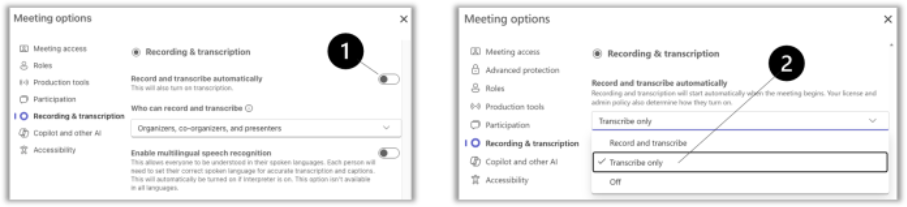
There is now a third setting for automatic transcription under "Meeting Options": It starts automatically at the beginning of the meeting without creating a recording. This provides better results for Microsoft Copilot and Recap.
Teams no longer disturbs on Windows
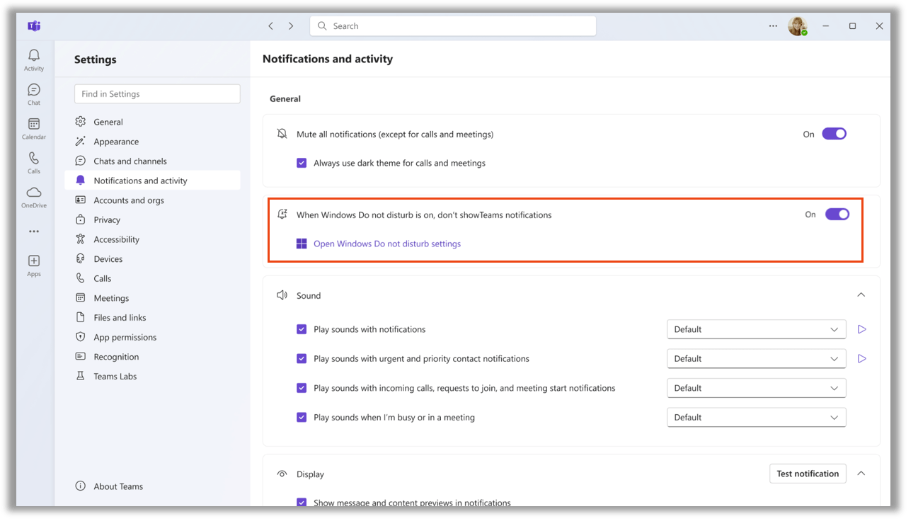
Microsoft Teams on Windows 11 will soon respect Windows' "Do Not Disturb" (DND) settings.
Improved sharing and shared files
It's often awkward when content needs approval during a live meeting. A new interface aims to simplify approvals. A new configurable approval panel prevents accidental submissions. In the future, shared screen content will be analyzed by Copilot if recording is enabled, making it possible to find specific information. Copilot can also create new content based on the meeting and incorporate shared content.
More on this: Copilot for shared content

You might also be interested in