

Key takeaways
- Azure Local is a hyperconverged infrastructure (HCI) solution that manages local server hardware via the same Azure interface used for cloud resources.
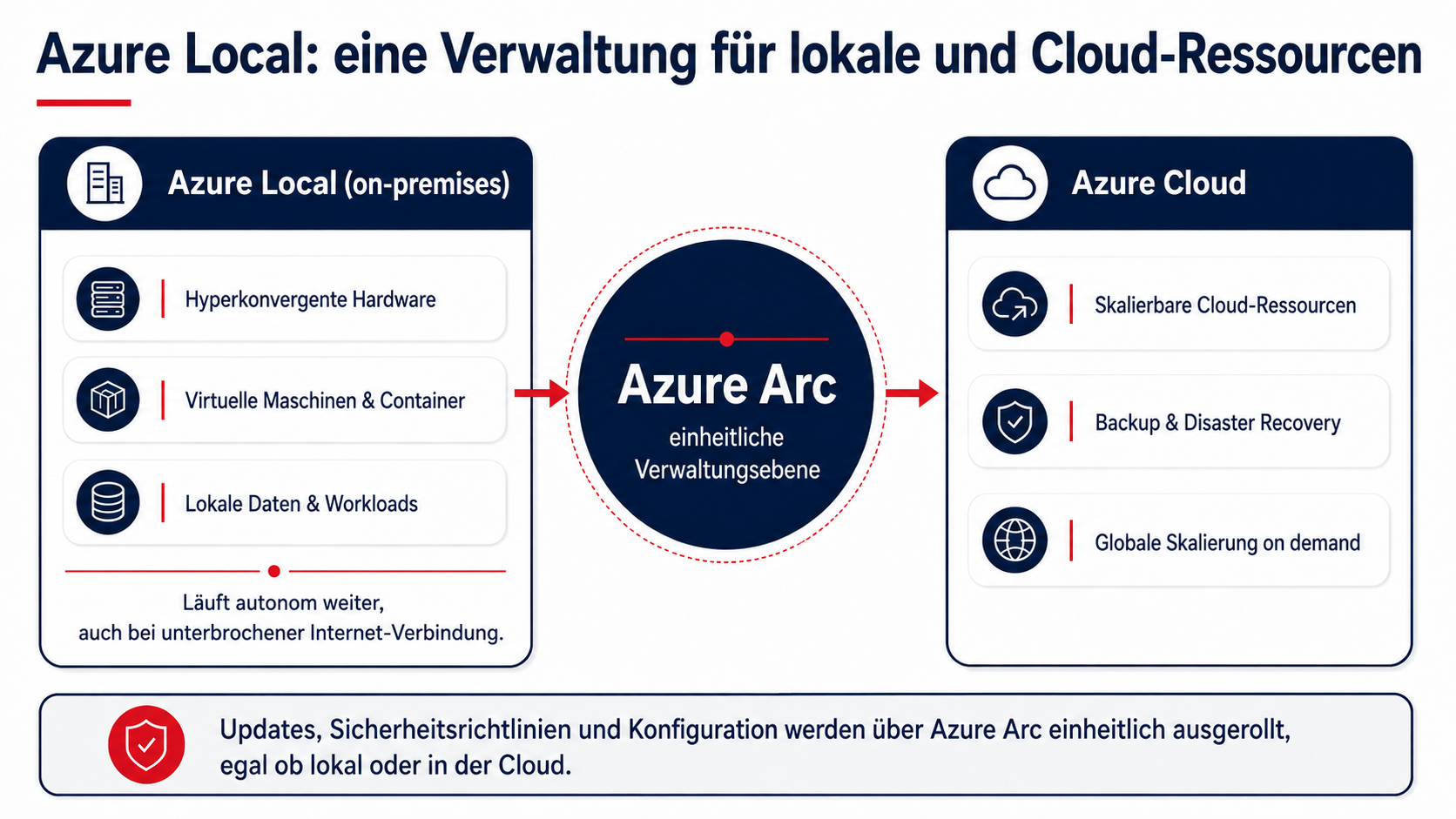
- The central management layer is Azure Arc, which is used to uniformly roll out updates, security policies, and configurations, whether on-premises or in the cloud.
- Azure Local is the evolution of Azure Stack HCI, featuring expanded capabilities for containers/Kubernetes and tighter Azure integration (e.g., Azure Virtual Desktop).
- Key use cases: Data residency/compliance (e.g., FINMA), latency-sensitive workloads, operation during temporary internet outages, and modernization of existing virtualization environments.
- It continues to run autonomously even if the connection to the cloud is interrupted—a key advantage over pure cloud solutions.
- Five-step implementation: Workload analysis, hardware selection, cluster setup with Azure Arc connectivity, migration of existing workloads, and ongoing operations.
- It is less suitable for companies without specific requirements for data residency, latency, or operational continuity, where a pure public cloud is often simpler.
Many companies face the same conflict of objectives: certain workloads and data must remain in their own data center for regulatory, security, or operational reasons, yet no one wants to forgo modern cloud tools and unified management. Azure Local resolves this exact conflict by running cloud technology directly on-premises. As Baggenstos we focus heavily on hybrid infrastructures; in this article, we explain the technical aspects of Azure Local, the architecture behind it, and the use cases for which the solution is best suited.
Azure Local as a bridge between local infrastructure and the cloud
Azure Local is a hyperconverged infrastructure (HCI) solution from Microsoft that manages local server hardware using the same Azure interface used for cloud resources. Workloads run physically in your own data center or server room but are controlled, monitored, and updated via Azure Arc just like a cloud service. For companies, this means a single management interface for both local and cloud resources, rather than two separate operational worlds with different tools and processes.
Architecture and core components of Azure Local
Hyperconverged hardware and cluster design
Azure Local runs on validated hardware certified in collaboration with Microsoft partners. Companies can scale from a single server node to a multi-node cluster, depending on the computing power and redundancy required for their specific workloads.
Management via Azure Arc
Azure Arc serves as the central control plane for Azure Local. Through Arc, updates, security policies, and configurations can be rolled out uniformly, regardless of whether a resource is running locally or in the Azure cloud. This significantly reduces the effort required for separate management tools and ensures consistent security standards across the entire infrastructure.
Virtual machines, containers, and Kubernetes
Azure Local supports both traditional virtual machines and containerized applications via Kubernetes. Specialized workloads like Azure Virtual Desktop can also be deployed directly on Azure Local, for instance, when session hosts need to run on-premises for data protection or latency reasons. You can find more about virtual desktop environments on our page for Azure Virtual Desktop.
Azure Local as the evolution of Azure Stack HCI
Azure Local is the evolution of what was previously known as Azure Stack HCI. The core technology—a hyperconverged infrastructure stack managed via Azure Arc—remains, but the new name reflects an expanded feature set: more options for container and Kubernetes workloads, tighter integration with Azure services like Azure Virtual Desktop, and a more consistent licensing model via the Azure portal. Organizations already using Azure Stack HCI can generally migrate to Azure Local without having to completely rebuild their existing infrastructure.
Use cases for Azure Local in Switzerland
For Swiss companies, using Azure Local in Switzerland offers several scenarios where the solution provides advantages over a pure public cloud approach:
The last point is particularly relevant for many companies currently needing to modernize their existing virtualization environments and looking for a future-proof, cloud-native alternative.
The benefits of hybrid cloud modernization with Azure Local
- A single management interface: Local and cloud resources are managed using the same tools, eliminating the need to maintain separate systems.
- Predictable costs: Hardware and operational costs for Azure Local are easy to plan.
- Operational continuity: Local workloads continue to run autonomously even if the internet connection is temporarily interrupted.
- Phased migration: Companies do not have to move everything to the public cloud at once; instead, they can modernize workloads strategically.
- Consistent security: Cloud-native security mechanisms, such as encryption and Defender integration, also apply to on-premises resources.
Getting started with Azure Local
The path to a productive Azure Local environment can be structured into a few phases:
- Workload analysis: Determine which applications must remain on-premises and which are suitable for the public cloud.
- Hardware selection: Choose validated hardware tailored to your required computing power, from single-node entry-level setups to multi-node clusters.
- Cluster setup and Azure Arc integration: The local infrastructure is set up and centrally connected via Azure Arc.
- Migration of existing workloads: Virtual machines from previous virtualization environments are migrated in stages.
- Ongoing operations: Updates, monitoring, and security policies are continuously managed via Azure Arc.
The role of Baggenstos as a Microsoft Solutions Partner
As a Microsoft Solutions Partner for Infrastructure, we support companies from the initial workload analysis through to the ongoing operation of their Azure Local environment. You can find more about our service portfolio, our approach, and frequently asked questions regarding costs, security, and migration here: Azure Local. For workloads better suited to the public cloud, please also take a look at our service offerings for Microsoft Azure as well as our cloud infrastructure solutions.
Conclusion
Azure Local combines the control and data sovereignty of local infrastructure with the management logic and tools of the Azure cloud. For companies that cannot or do not want to rely entirely on the public cloud for regulatory, security, or operational reasons, this creates a future-proof, hybrid alternative to traditional on-premises virtualization. The question of data residency plays a central role, especially for Azure Local in Switzerland.
Would you like to know if Azure Local is the right solution for your infrastructure? Get in touch with us, and we will be happy to advise you on your individual hybrid cloud strategy.
Frequently Asked Questions
What is the difference between Azure Local and Azure Stack HCI?
Azure Local is the evolution of Azure Stack HCI. The underlying hyperconverged architecture remains, now complemented by enhanced features for container and Kubernetes workloads, as well as tighter integration with other Azure services.
What is Azure Arc and what role does it play in Azure Local?
Azure Arc serves as the central management layer for controlling both on-premises Azure Local resources and those in the Azure cloud. It allows you to deploy updates, security policies, and configurations consistently across both environments.
What hardware is required for Azure Local?
Azure Local runs on validated hardware certified in collaboration with Microsoft partners. Scaling ranges from a single server node to a multi-node cluster, depending on your requirements for computing power and resilience.
Who is Azure Local not suitable for?
For companies that prefer to operate entirely without their own hardware, or whose workloads do not have specific requirements regarding data residency, latency, or business continuity, a pure public cloud solution is often the simpler choice, eliminating the need for in-house hardware maintenance.
Does Azure Local continue to run offline or without an internet connection?
Yes, local workloads on Azure Local continue to run autonomously even if the connection to the Azure cloud is temporarily interrupted. It is important to note that the connection must be restored within 30 days; permanent operation without any internet connection is not supported.