Teams Update: Stay Connected to Collaboration with the Latest Client
Key takeaways
- New features: personal ringtones for mobile, file-opening preferences, meeting insights with a speaker list and suggested tasks, Network Strength Indicator and two-way Google Workspace synchronization
- Old Teams clients (older than 90 days) are now being blocked. The Modern Lifecycle Policy requires up-to-date versions for application security
Who’s Calling?
The mobile versions of Teams (Android and iOS) will soon allow users to set different sounds for various types of calls and alerts. This way, you’ll know right away whether you need to pick up immediately or can wait until your current meeting ends. These ringtone settings are configured directly on your device and are personal. New: the "Beep" tone plays every five seconds during the ringing period to help you notice calls more easily.
Where Should the File Open?
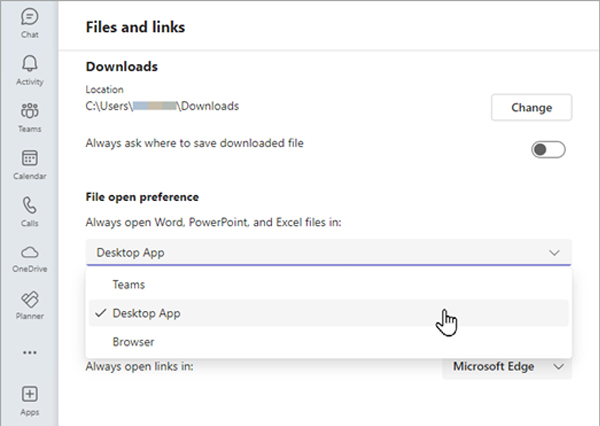
Productivity also means having the freedom to choose the right software for your tasks. Teams will now let you open files directly in the appropriate Microsoft 365 desktop app, in the browser, or within Teams itself. You’ll find this option in the settings under «Files and Links.»
That’s What We Discussed!
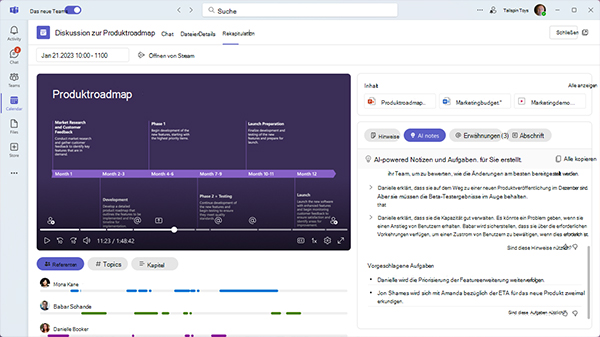
Users with access to the intelligent meeting recap will now receive additional insights, including a list of speakers, mentions of participants by name during the meeting, and suggested action items.
How’s the Connection?
Meeting disruptions are often due to poor network conditions. To improve transparency, Microsoft is introducing the "Network Strength Indicator" in the coming months. This new feature will show current network quality in three levels and suggest steps for improving the connection. It also indicates which side is experiencing technical issues.

Older Teams Versions Are Retiring
Microsoft is no longer allowing older versions of Teams to run. This enforces a policy announced two years ago: any Teams client older than 90 days will be blocked. According to Microsoft, this move supports «application security.» The Modern Lifecycle Policy requires all users to work with the latest Teams version. Users will receive a warning 60 days before the deadline (or 30 days in virtual desktop environments). Administrators should ensure Teams is set to update automatically.

Hello, Google Workspace!
Companies using Google Workspace for email and calendars can now activate two-way synchronization with Microsoft Teams through the Teams admin app. This improved sync ensures that appointments created on either platform are reflected on both sides, reducing missed meetings and simplifying scheduling.
That said, Baggenstos still recommends migrating to Microsoft 365 – synchronization may be helpful in exceptional cases. Our Modern Workplace experts are happy to advise you.
You might also be interested in